The honest version of the opposite argument
The sensible advice for a small software practice is to pay for managed everything. A managed database, a platform that deploys from a git push, an APM product, an analytics product, an uptime product, a log product. Each one is a modest monthly line, each one removes a class of three-in-the- morning problem, and the time you save is worth more than the money. We agree with every word of that for a team whose product has found its market and whose engineers bill by the hour to someone else.
It is the wrong advice for the stage most of our work is at. A consultancy that ships a working, deployed proof for every serious conversation, an early product with pilots and no paying customers yet, a set of free tools that exist to be found by search: none of these has revenue that scales with the bill. Ten managed services at a modest price each is a real monthly number, and it arrives whether anyone visited or not. Worse, every one of them holds a slice of your data in its own format, on its own retention schedule, behind its own export button.
So we went the other way, on purpose, and wrote down the rules that make it hold. This piece is the whole method. Two companion pieces cover the monitoring and the analytics in detail, and the code for both is public.
What is actually running
The first server carries the things that earn or will earn: the paying product, the early product that pilots are using, and a few small sites. It runs nine containers and has been up for 147 days. The second server carries everything else that needs a process: about fifty backend demos in Rails, Go, Node and PHP, a shared Postgres holding roughly twenty application databases, a staging copy of the product, the analytics collector, a password-gated reader, a WebSocket relay. It runs fifty-one containers and has been up for 117 days. Everything that can be static is static, on Cloudflare Pages, and there are ninety-six of those.
None of this is clever. It is a placement rule applied every single time, plus a handful of habits that keep two gigabytes of memory from becoming a wall.
The placement rule
Every new thing gets placed by the cheapest surface that still proves the point, and the question is asked in this order.

The order matters more than the boxes. Static first, because a Pages project costs nothing to run, scales without thought and survives a server dying. A surprising amount turns out to be static once you ask: calculators, games, reports, documentation, even a text-to-SQL tool that runs DuckDB in the browser and needs one small edge Function to hold an API key. Only when something genuinely needs a process does it go to a server, and the first server is closed to new tenants by default. It carries revenue. Nothing experimental gets to compete with it for memory.
The rule has one more clause, which is the one that keeps the second server alive: before you choose a host, take a live reading of it. Not the number in last week’s notes. The available memory, the disk, the container count, right now. The second server has been anywhere between 220 and 620 MB available over the last month, depending on what was deployed and what had been pruned, and a choice made on a stale number is how you find out what the kernel’s OOM killer prefers.
Two gigabytes is a budget, so spend it like one
On a 2 GB machine, memory is the constraint long before CPU. The load average on both servers sits well under one most of the day. So every decision about a backend is really a decision about resident memory, and we make it explicitly.
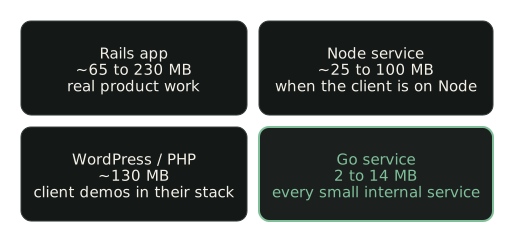
Four habits follow from that table.
Every container gets a memory cap. docker run --memory 300m for a Rails app, 192m for the
analytics collector, 48m for the WebSocket relay. A leak in one demo then kills that demo, not the
server. The cap is also documentation: anyone reading docker inspect knows what the thing was
expected to cost.
Small internal services are written in Go. The analytics collector is a single static binary with a pure-Go SQLite driver, and it sits at about 12 MB resident. The relay behind a multiplayer typing race sits at about 1.5 MB. The private reader that serves files out of a storage bucket sits at about 14 MB. A Rails or Node version of any of these would cost ten to twenty times the memory for no benefit the user would notice.
One Postgres, many databases. Rather than a database container per app, the second server runs a single Postgres 17 container with a database per app. Twenty application databases share one set of buffers and one backup routine. Each app has its own role and cannot see the others.
No Redis unless something proves it needs Redis. Background jobs run in-process (Solid Queue
inside Puma for Rails) or on Postgres with SKIP LOCKED. Every Redis we did not start is 30 MB or so
we did not spend, and one fewer thing to secure.
There is a fifth habit that sounds trivial and has been worth more than all of the above combined: prune the build cache. Docker’s buildkit keeps layers from every remote build. On two separate days, pruning it reclaimed 5.2 GB and 7.7 GB of disk. On a 40 GB disk that is the difference between deploying and not.
Cloudflare does the parts a server is bad at
The free edge is not a place we put things because it is free. It is where the jobs that a single small server is bad at belong.
TLS, caching and absorbing junk traffic happen at the edge. Static sites live there entirely. DNS for every hostname lives there. Inbound mail for the domain is a catch-all routing rule that forwards to one inbox, so any address can be handed out without a mail server. When a site needs a few lines of server code (forwarding an analytics event, holding a model API key, rate-limiting a public endpoint) it gets a Pages Function rather than a container. The text-to-SQL tool mentioned above is a static page plus one Function; it has never touched either server.
The edge also knows things a server cannot, and it hands them to a Function for free: the organisation that owns the visitor’s IP address, its ASN, the city, whether Cloudflare has already classified the request as a known crawler. That single fact is why our analytics endpoint runs at the edge rather than on a box, and it is the subject of the third piece.
Large static media (a 40 MB game build, audio corpora) goes to object storage rather than either server’s disk, because disk on a small server is the second scarcest thing after memory.
The agent is the operations team
The part that makes this sustainable for a very small team is that the operations work is done by a coding agent working from written procedures, and it is held to those procedures the same way a new hire would be.
Three documents carry the whole thing. An inventory file lists every deployment on every surface,
one row each, with its hostname, what it is for, its goal and whether it stays. Any session that
deploys, removes or changes anything updates that file in the same session. A runbook per hosting
surface holds the exact commands: deploy a Pages site, put a container behind the proxy, add a DNS
record, which credential opens what (by file path, never by value). And a set of lessons files
holds every trap that has cost us an afternoon, so it costs the next session nothing: Kamal’s secrets
parser mangling a default value, a Pages deploy from the wrong directory silently dropping its
Functions, a health check that fails because / is behind basic auth.
The agent reads those before it acts. Before any deploy it takes the live reading and states the numbers. After any deploy it writes the inventory row and a dated release note. At the end of every session it writes a report of what it did and what the next session needs to know. The procedures are boring on purpose. Boring procedures are the ones that get followed at two in the morning.
This is also where the monitoring budget went. An APM product’s real value is a person looking at the data every day. We have the data already (the next piece shows where it lives), so the daily look is a scripted pull plus an agent reading a one-page summary. The code for that is public as shoestring.
Two small servers, the domains, object storage measured in megabytes, and the coding agent we already use to write the software. Model calls inside the products run on free tiers where the volume allows. There is no line on the bill for monitoring, analytics, logs, uptime, a managed database or a deploy platform.
Where this is wrong
Two small servers are two single points of failure. If the first one dies, the paying product is down until it is rebuilt from the deploy configuration and the last database backup. We have accepted that trade for this stage, written down the rebuild steps, and would not accept it for a product with customers who pay for uptime.
And the method only works if the readings are taken. This morning’s reading, the one used for the numbers in this piece, shows the second server with 217 MB of memory available, swap completely full, and nine kernel OOM-kill lines in the last 24 hours, one of them a remote build container killed mid-build. Nothing user-facing went down, and that is luck as much as design. The same reading shows the first server giving 521 MB, more than a quarter of its memory, to an idle build container left behind by the last deploy. Both findings came from the monitoring pull described in the next piece, on its first run. That is the argument for running it daily, and an argument against the idea that thrift is free. It costs attention, and the attention has to be scheduled.
What to take from it on Monday
If you are at the stage where revenue does not yet scale with the bill, try the placement rule on your own estate. List every deployment. Ask of each one, in order: could this be static, does it need a process, does it earn. Put a memory cap on every container that does not have one, and write down why the number is what it is. Find the services that could be a 10 MB binary instead of a 300 MB runtime. Prune the build cache and see how much disk comes back.
Then write the inventory, and make whoever deploys (a person or an agent) update it in the same breath. Thrift at this scale is mostly bookkeeping. The servers are cheap. Knowing exactly what is on them is the part that keeps them cheap.
- shoestring: the monitoring kit described here (GitHub, MIT) the boxwatch and analytics code extracted from this estate, credentials removed
- Hetzner Cloud shared vCPU plans CPX11 is 2 vCPU, 2 GB RAM, 40 GB disk; check the page for current pricing in your region
- Cloudflare Pages limits and Functions pricing the free plan's build, file and request limits we design inside
- kamal-proxy the reverse proxy in front of every container on both servers